
Your Cadillac EV and the Tesla Supercharger Network: A Guide for Colorado Springs Drivers
The world of electric vehicles (EVs) is constantly evolving, and here at Red Noland Cadillac, we’re dedicated to helping you navigate it with confidence. With more and more automakers, including Cadillac, adopting the North American Charging Standard (NACS), also known as the Tesla charging port, the Tesla Supercharger network is becoming a valuable resource for non-Tesla EV owners.
If you’re a proud owner of a Cadillac LYRIQ, OPTIQ, VISTIQ or ESCALADE IQ with a Combined Charging System (CCS) port, you might be wondering how you can take advantage of Tesla’s extensive and reliable fast-charging network. The good news is that it’s simpler than you might think. Here’s a quick guide on how it all works, where you can charge in Colorado Springs, and what you need to know.
How It Works: The NACS Adapter, the Tesla App, and the MyCadillac App
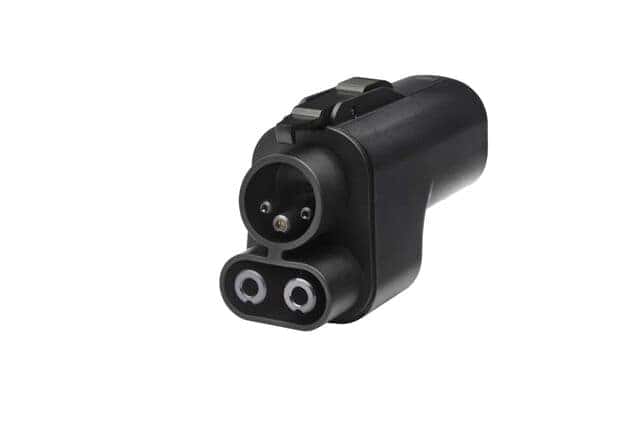
The key to unlocking the Tesla Supercharger network for your non-Tesla EV is a specialized adapter. While newer EVs are increasingly being built with a native NACS port, many existing models with a CCS port can still use Superchargers with an adapter. This CCS to NACS adapter (sometimes referred to as a “Tesla to CCS adapter” but for a non-Tesla vehicle it’s a CCS to NACS) is the bridge between your car’s charging port and the Tesla Supercharger cable. This adaptor can be purchase from Red Noland Cadillac Parts
Cadillac is also streamlining access to the Tesla Supercharger network through the MyCadillac Mobile App. This integration provides an alternative to using the Tesla app directly, offering a more integrated experience for Cadillac owners.
Here’s how both methods work:
Using the Tesla App:


- Get the Right Adapter: You’ll need to purchase a high-quality CCS to NACS adapter. These are now available from various third-party companies and in some cases, directly from your vehicle’s manufacturer. It’s important to choose one that is UL and FCC compliant for safety and has a high-power rating to ensure you can take advantage of the fast-charging speeds. Some adapters can handle up to 500 kW, but your vehicle’s charging speed will depend on its own specifications and the charger itself.
- Download the Tesla App: Download the official Tesla app on your smartphone and create an account. This app is your portal to the Supercharger network for billing and station information.
- Find a Supercharger: In the Tesla app, you can select “Charge Your Non-Tesla” or a similar option to find Supercharger locations that are open to other EVs. You’ll be able to see real-time availability and charging speeds.
- Start Charging: When you arrive at an eligible Supercharger station, simply plug in your adapter to your car’s CCS port, and then connect the Tesla Supercharger cable to the adapter. In the app, select the stall number you’re using and tap “Start Charging.” The app will handle the payment, often by placing a temporary authorization hold on your payment method.
- Finish Up: When your charging session is complete, simply tap “Stop Charging” in the app, and you’re good to go. The app will release the final payment and any remaining hold.
Using the MyCadillac App:
- Ensure App and Vehicle Compatibility: Make sure you have the latest version of the MyCadillac app installed on your smartphone and that your Cadillac EV is compatible with this feature. Check for announcements and updates from Cadillac regarding Supercharger network access via the app.
- Navigate to Charging Options: Open the MyCadillac app and navigate to the charging or energy section. You should find an option related to public charging networks.
- Locate Tesla Superchargers: Within the charging network options, you should be able to filter or view Tesla Supercharger locations that are accessible to non-Tesla vehicles. The app will likely display real-time availability and possibly charging speeds.
- Initiate Charging (Potentially Seamless): Once you arrive at a compatible Supercharger station and have connected your CCS to NACS adapter, you may be able to initiate the charging session directly through the MyCadillac app. Follow the on-screen prompts. The app will likely have your payment information already linked, making the process smoother.
- Monitor and Stop Charging: The MyCadillac app will allow you to monitor your charging progress and stop the session when you’re ready.9 Payment will be processed through your linked account.
Important Note: While Cadillac is working to integrate Tesla Supercharger access into the MyCadillac app, the exact functionality and availability may vary. Always refer to the latest updates and instructions within the MyCadillac app for the most accurate information on accessing the Tesla network through the Cadillac interface. In the interim or if full integration isn’t yet available, using the Tesla app directly as described above remains a reliable method.
Where to Find Superchargers in Colorado Springs
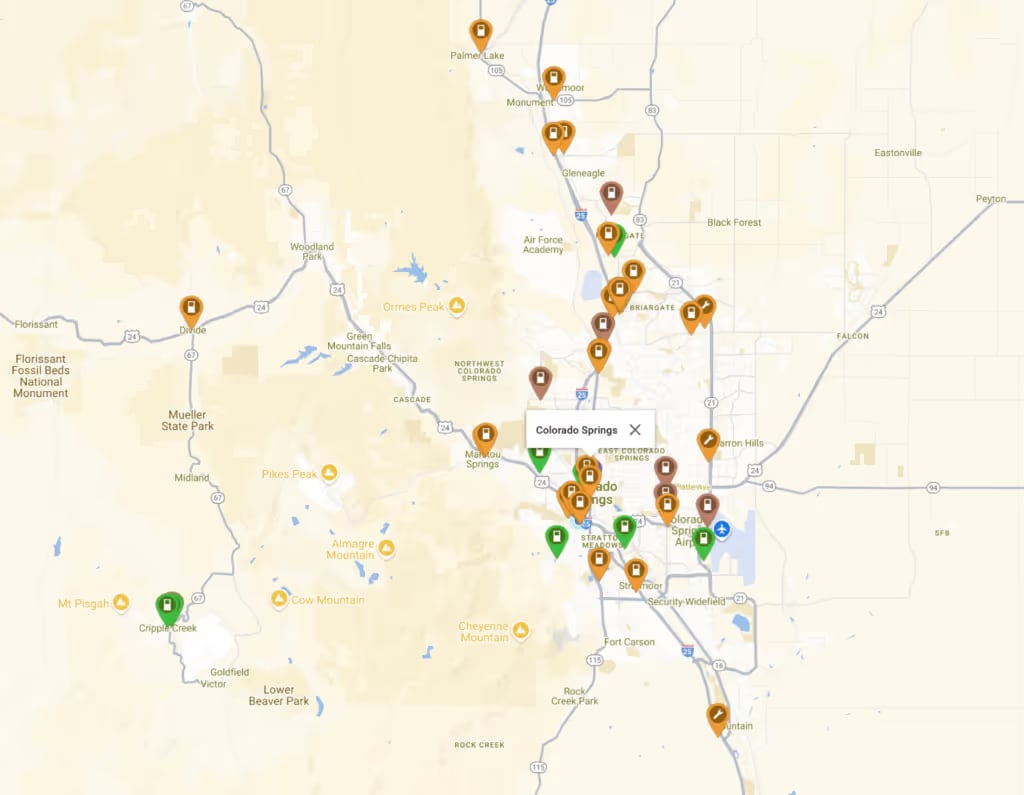
As a Cadillac EV owner in the Colorado Springs area, you have access to several charging options, and the Supercharger network is a great addition. Red Noland Cadillac in Colorado Springs can help you explore charging solutions and locate nearby EV charging stations for seamless travel throughout Colorado. There are also sites such as Plugshare.com, which can help you locate a DC Fast Charging Station and plan your road trip for optimal charging times and locations. They even have an app on the Apple Store and the Google Play Store!
For the most up-to-date information on available Superchargers in Colorado Springs and beyond, always check the Tesla app or the charging network map within the MyCadillac app.
The Cadillac Advantage at Red Noland Cadillac
While the Tesla Supercharger network offers an excellent solution for longer trips and quick top-ups, remember that your Cadillac EV comes with a suite of charging solutions, including access to other public charging networks and the convenience of home charging. The integration of Tesla Supercharger access into the MyCadillac app further enhances the convenience for our owners.
At Red Noland Cadillac, our team is always ready to answer your questions about EV ownership, from charging options to understanding how to use both the Tesla and MyCadillac apps for charging, to maintenance and everything in between. We’re here to help you get the most out of your Cadillac Lyriq and ensure you have a seamless and enjoyable electric driving experience.
